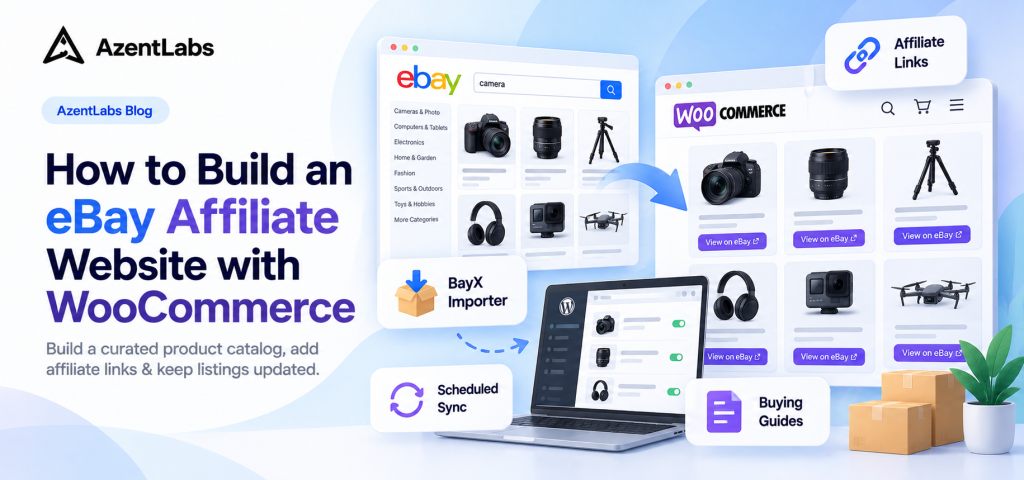
Want to build an eBay affiliate website without managing inventory, processing orders, or handling shipping?
With WordPress and WooCommerce, you can create a product-focused website that helps shoppers discover items on eBay while earning commissions from qualifying purchases through the eBay Partner Network (EPN).
However, building an affiliate website involves more than adding product links. You need to choose a niche, organize products, create useful content, configure affiliate tracking, and keep product information updated.
Managing these tasks manually can become time-consuming as your catalog grows.
That’s where BayX Importer for WooCommerce can help. The plugin allows you to search for eBay products, import selected listings into WooCommerce, configure affiliate links, and automatically synchronize supported product details.
In this guide, you’ll learn how to build an eBay affiliate website with WooCommerce, connect eBay Partner Network, import products, and develop an SEO-friendly affiliate website.
What Is an eBay Affiliate Website?
An eBay affiliate website is a website that recommends products available on eBay and directs visitors to the marketplace through affiliate links.
Instead of selling products directly, the website acts as a product discovery and recommendation platform.
Here’s how the process typically works:
- A visitor discovers your website through Google, social media, or another traffic source.
- They read a buying guide, product comparison, or recommendation.
- They click an affiliate link to view a product on eBay.
- They complete a purchase or another eligible action on eBay.
- You may earn a commission if the transaction qualifies under eBay Partner Network rules.
For example, imagine you run a website focused on photography equipment.
You could publish articles such as:
- Best Camera Accessories for Beginners
- Top Travel Tripods for Photography
- How to Choose a Used DSLR Camera
- Essential Accessories for Mirrorless Cameras
Within these articles, you could recommend relevant products from eBay.
Visitors would use your website to research and compare products, then visit eBay when they’re ready to purchase.
The main advantage: You can focus on product research, recommendations, and content creation without operating a traditional online retail business.
However, affiliate commissions depend on qualifying transactions, program terms, and tracking requirements. Not every click or purchase generates a commission.
Why Choose WooCommerce for eBay Affiliate Marketing?
WooCommerce is widely used to create online stores with WordPress, but it can also support affiliate product catalogs.
For eBay affiliate marketers, WooCommerce offers several useful capabilities.
1. Create a Professional Product Catalog
WooCommerce provides built-in product management features, including product pages, categories, images, descriptions, and attributes.
You can organize products by topic or customer need.
For example, a photography website could contain categories such as:
- Cameras
- Camera Lenses
- Tripods
- Camera Bags
- Lighting Equipment
This helps visitors browse related products without searching through unrelated listings.
2. Use External/Affiliate Products
One of WooCommerce’s most useful features for affiliate websites is its External/Affiliate product type.
Unlike a standard WooCommerce product, an External product links to another website where customers can complete their purchases.
For an eBay affiliate website, that destination can be an eBay product listing.
Instead of displaying a traditional Add to Cart button, your product page can display a button such as:
View on eBay
This allows visitors to explore products on your website while completing transactions on eBay.
3. Combine Product Listings with SEO Content
An affiliate website shouldn’t rely entirely on product listings.
WordPress makes it easy to create helpful articles, buying guides, comparisons, and tutorials.
For example, you could publish an article titled:
Best Camera Tripods for Travel: What to Look For
Within that article, you could explain important features and recommend relevant eBay products.
This approach provides more value than simply displaying imported product descriptions.
4. Manage Your Website Independently
Using WordPress and WooCommerce gives you control over your website’s structure, design, content, and product organization.
You can create a specialized affiliate website built around a particular audience rather than a generic collection of marketplace products.
What Do You Need to Start an eBay Affiliate Website?
Before getting started, prepare the following:
| Requirement | Purpose |
|---|---|
| WordPress website | Host your affiliate content and product pages |
| WooCommerce | Manage your product catalog |
| eBay Partner Network account | Obtain affiliate tracking information |
| eBay Developer account | Obtain API credentials for product importing |
| BayX Importer for WooCommerce | Import and synchronize supported eBay product data |
| A specific niche | Attract visitors interested in related products |
You can find the necessary services here:
Once your WordPress website and WooCommerce installation are ready, follow the steps below.
Step 1: Choose a Niche for Your eBay Affiliate Website
Choosing a niche is one of the most important decisions when building an affiliate website.
Although eBay offers products across many categories, promoting unrelated items on the same website can make it difficult to build a clear audience and content strategy.
Instead, choose a topic where you can provide useful advice.
Potential niches include:
| Affiliate Niche | Example Products |
|---|---|
| Photography | Cameras, lenses, tripods, accessories |
| Gaming | Controllers, headsets, keyboards |
| Home Office | Monitor arms, desk lamps, laptop stands |
| Automotive | Car accessories, diagnostic tools |
| Collectibles | Vintage items, memorabilia |
| DIY & Tools | Hand tools, power tools, workshop equipment |
For this tutorial, let’s use a photography accessories website as an example.
Our goal is to create a website that helps shoppers discover useful camera accessories, compare options, and visit relevant listings on eBay.
We’ll focus on importing a small, carefully selected group of products rather than hundreds of unrelated items.
Tip: Start with products you understand well enough to explain their benefits, limitations, and suitability for different customers.
Step 2: Join the eBay Partner Network
The eBay Partner Network is eBay’s official affiliate marketing program.
Eligible publishers can earn commissions by referring traffic that results in qualifying transactions.
To get started:
- Visit the eBay Partner Network website.
- Register or sign in to your account.
- Complete the required publisher information.
- Follow the applicable approval and account setup process.
- Locate your Campaign ID when your account is ready.
Your Campaign ID is used to identify affiliate traffic associated with your campaign.
You’ll use this information later when configuring BayX Importer.
Understand How Affiliate Commissions Work
It’s important to understand that joining the eBay Partner Network doesn’t mean you’ll earn a commission from every sale.
Commission eligibility and amounts are determined by the program’s current rules, which may vary by category, marketplace, and transaction conditions.
Review the official EPN terms before publishing affiliate links.
Step 3: Install WooCommerce and BayX Importer
After setting up WordPress, install and activate WooCommerce.
Next, install BayX Importer for WooCommerce.
BayX Importer helps WooCommerce store owners import product information from eBay without manually creating every product listing.
Its key capabilities include:
- Search eBay products by keywords, categories, or images.
- Apply supported search filters.
- Import titles, descriptions, prices, images, attributes, and galleries.
- Select which products to import.
- Import products as Simple or External products.
- Integrate eBay Partner Network affiliate links.
- Automatically synchronize supported product information.
- Choose between externally hosted and locally stored product images.
- Work with multiple supported eBay marketplaces.
After activating the plugin, navigate to:
WordPress Dashboard → WooCommerce → eBay Importer
You’ll find the plugin’s import tools and settings there.
Step 4: Connect BayX Importer to the eBay API
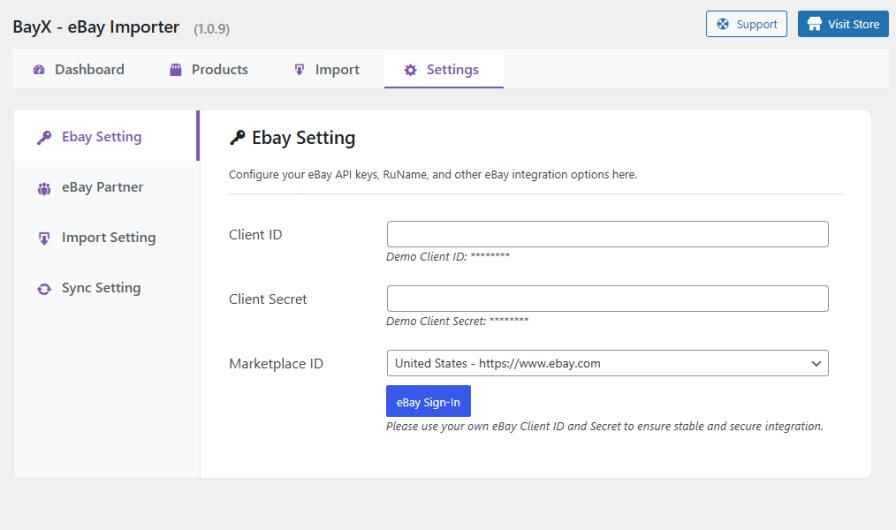
Before importing products, BayX Importer needs access to eBay product information through the eBay API.
To establish this connection, you’ll need API credentials from the eBay Developer Program.
Get Your eBay API Credentials
- Visit the eBay Developer Program.
- Sign in or register for a developer account.
- Create or configure your application.
- Obtain the required Client ID and Client Secret.
Keep these credentials secure.
Add Your API Credentials to BayX Importer
In your WordPress dashboard:
- Open WooCommerce → eBay Importer.
- Navigate to Settings → eBay Setting.
- Enter your eBay Client ID.
- Enter your eBay Client Secret.
- Save your settings.
With valid credentials and the necessary API access, BayX Importer can retrieve eBay product information.
The plugin uses eBay’s API, so successful requests also depend on applicable eBay API availability, permissions, and usage limits.
Step 5: Configure eBay Partner Network Affiliate Tracking
Before importing products for your affiliate website, configure your affiliate tracking information.
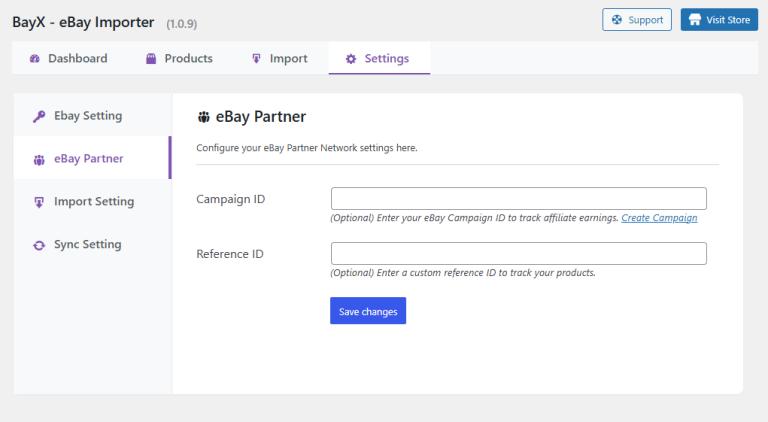
BayX Importer includes integration with the eBay Partner Network, allowing imported products to use supported affiliate links.
Add Your EPN Campaign ID
In WordPress:
- Navigate to WooCommerce → eBay Importer.
- Open Settings → eBay Partner.
- Enter your eBay Partner Network Campaign ID.
- Configure a Reference ID if needed and supported by your setup.
- Save your settings.
Once affiliate tracking is configured, BayX Importer can include the relevant tracking information in supported imported product links.
This reduces the need to manually construct an affiliate URL for every product.
Add an Affiliate Disclosure
If you earn commissions from affiliate links, clearly disclose your relationship with the affiliate program.
For example:
As an eBay Partner Network affiliate, I may earn commissions from qualifying purchases.
Place disclosures prominently near relevant affiliate promotions or links and comply with applicable laws and eBay Partner Network requirements.
Remember that BayX Importer helps manage affiliate tracking links. It does not decide whether a purchase qualifies for a commission.
Step 6: Import eBay Products into WooCommerce
Now you’re ready to add products to your affiliate website.
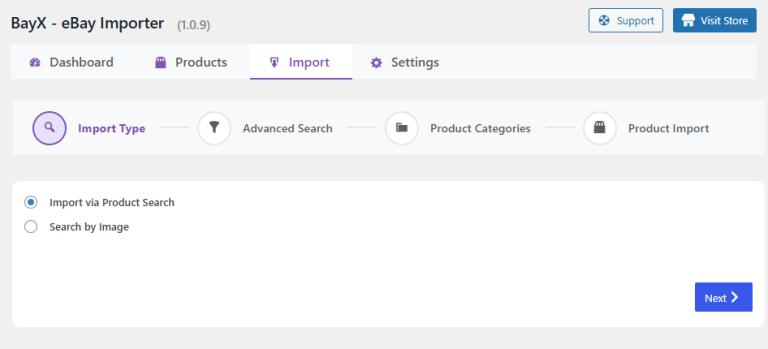
BayX Importer lets you search for items on eBay and select the listings you want to bring into WooCommerce.
Search for Relevant Products
Navigate to:
WooCommerce → eBay Importer → Import
Search for products related to your niche.
For our photography example, you might search for:
- Camera tripod
- Mirrorless camera bag
- Camera cleaning kit
- Portable photography light
You can also use supported category, image search, and filtering options to refine results.
Review each product before importing it.
Choose products that are relevant to your website’s topic and useful for your target audience.
Configure External Product Import Settings
For an affiliate website, configure the importer to create WooCommerce External products.
Go to:
WooCommerce → eBay Importer → Settings → Import Settings
Configure the available options:
Product Type: External
This allows imported products to direct visitors to an external destination instead of using the standard WooCommerce checkout.
Product Status: Draft
Using Draft status initially gives you an opportunity to review imported product information before publishing it.
Import Data: Select the product fields you need, such as titles, descriptions, and images.
Save your settings before proceeding.
Select and Import Products
Return to the Import tab.
Select the eBay products you want to add, configure any relevant category assignments, and initiate the import process.
BayX Importer retrieves the selected product information and creates corresponding WooCommerce products.
The time required depends on factors such as the number of selected products and eBay API response times.
Review Your Imported Products
Once the import is complete, open:
WooCommerce → Products
Review each imported product for:
- Accurate product title
- Relevant images
- Useful description
- Appropriate category
- External product configuration
- Correct product destination URL
For our photography website, we might import a few tripods, camera bags, and cleaning accessories.
It’s better to publish a smaller group of relevant products than a large catalog that doesn’t help visitors make purchasing decisions.
For a detailed import tutorial, see our existing guide:
How to Import eBay Products to WooCommerce and Keep Them Updated
Step 7: Verify Your eBay Affiliate Product Links
After importing your products, verify that affiliate links work correctly.
Open one of the imported External product pages on your website.
Find the button that directs visitors to eBay.
Depending on your configuration, it may display text such as Buy on eBay or another external product button label.
Check the link destination and confirm that the expected affiliate tracking information is present.
You should also test the link by opening it and verifying that it leads to the intended eBay listing.
Why This Step Matters
Affiliate tracking depends on properly configured links and valid tracking information.
A product page that simply links to eBay without the intended affiliate tracking configuration may not provide the attribution you expect.
Always verify representative links after setting up your affiliate integration.
You can also check your eBay Partner Network reporting tools for information about eligible activity once traffic and reporting data become available.
Step 8: Enable Automatic eBay Product Synchronization
One challenge of managing imported marketplace products is keeping their information current.
Prices, descriptions, and listing details can change on eBay.
Without regular updates, your WooCommerce product pages may eventually display outdated information.
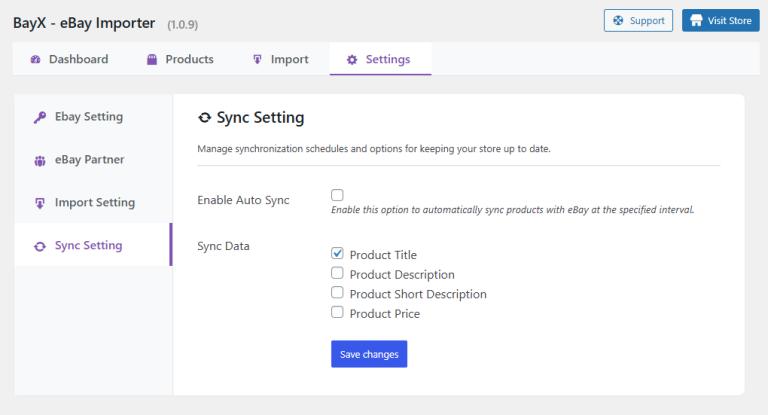
BayX Importer includes automatic synchronization for supported product fields.
Configure Product Sync
Navigate to:
WooCommerce → eBay Importer → Settings → Sync Settings
The plugin allows you to enable synchronization for supported fields, including:
- Product title
- Product price
- Product description
You can configure automatic synchronization schedules such as:
- Daily
- Weekly
- Monthly
You can also initiate a manual synchronization when needed.
Which Sync Schedule Should You Choose?
The appropriate frequency depends on your product catalog and how often the information changes.
For example:
| Product Catalog | Suggested Starting Schedule |
|---|---|
| Frequently changing product prices | Daily |
| General affiliate product catalog | Weekly |
| Relatively stable product information | Monthly |
These are suggested starting points, not guaranteed optimal settings. Review your catalog and adjust as necessary.
Important: Automatic Sync Is Not Real-Time Sync
BayX Importer updates supported product fields according to the configured synchronization schedule.
It does not guarantee that every change on eBay will appear instantly on your WooCommerce website.
For this reason, avoid presenting imported information as guaranteed real-time pricing or availability.
You can include a short note on your website:
Product prices and availability may change. Please check the latest information on eBay before purchasing.
This helps set appropriate expectations for visitors.
Step 9: Choose the Right Product Image Settings
Product images help visitors understand what you’re recommending.
BayX Importer provides options for managing images associated with imported eBay products.
Option 1: Use eBay-Hosted Images
You can configure the plugin to use supported external image URLs.
This can reduce the amount of local storage required on your WordPress hosting environment.
However, externally hosted images depend on the source remaining available.
Option 2: Download Images to WordPress
Alternatively, you can configure BayX Importer to download supported product images to your website.
This provides more direct control over locally stored media files but requires server storage and image management.
Which Option Is Better?
For a smaller affiliate website, either approach may be suitable depending on your hosting setup.
If your website contains many products, consider the impact of images on storage, page speed, and maintenance.
Always follow applicable image usage rights and eBay policies.
Regardless of which option you choose, optimize your website for mobile visitors and avoid unnecessarily large image files.
Step 10: Create SEO-Friendly Content Around Your Products
Importing eBay products helps build your catalog, but product listings alone are not a complete SEO strategy.
To attract visitors from search engines, your website should provide information that helps people make purchasing decisions.
Create Helpful Buying Guides
Suppose your website promotes photography accessories.
You could publish a guide titled:
How to Choose the Best Travel Tripod for Your Camera
Within the guide, explain:
- Weight and portability
- Material differences
- Maximum load capacity
- Stability
- Camera compatibility
- Price considerations
You can then recommend relevant products available through your WooCommerce affiliate catalog.
This gives readers a reason to visit your website beyond simply viewing product listings.
Write Product Comparison Articles
Comparison articles can help visitors evaluate alternatives.
For example:
Carbon Fiber vs. Aluminum Tripods: Which Should You Buy?
A useful article could compare:
| Feature | Carbon Fiber | Aluminum |
|---|---|---|
| Weight | Generally lighter | Often heavier |
| Price | Generally more expensive | Often more affordable |
| Portability | Useful for travel | Depends on design |
| Stability | Depends on construction | Depends on construction |
After explaining the differences, you can recommend relevant products.
Be careful to verify specifications before making product-specific claims.
Improve Imported Product Descriptions
Although BayX Importer can import eBay product descriptions, relying exclusively on imported text may provide limited additional value for readers.
Consider adding original information such as:
- Who the product is suitable for
- Important buying considerations
- Compatibility details
- Advantages and potential limitations
- Links to relevant buying guides
Avoid making unsupported claims about products you haven’t tested.
Build a Clear Internal Linking Structure
Internal links help visitors navigate between articles and relevant product categories.
For example:
Buying Guide → Product Category → Product Page → eBay Listing
A guide about travel photography could link to a category containing camera tripods.
Individual product pages could link back to the related buying guide for further context.
This provides a more connected user experience.
Step 11: Optimize Your eBay Affiliate Website for Search Engines
Beyond publishing useful content, pay attention to your website’s technical SEO.
Use Clear URLs
Keep URLs descriptive and readable.
For example:
yourwebsite.com/best-travel-tripods/
is clearer than a long URL containing unrelated parameters.
Write Unique SEO Titles
Give important pages descriptive titles that reflect their content.
For example:
Best Camera Bags for Travel: Buying Guide and Recommendations
Avoid using the exact same title structure for every page.
Optimize Meta Descriptions
Write concise meta descriptions that communicate the page’s value.
A good meta description should help readers understand what they’ll find on the page.
Improve Page Speed
Product-heavy websites can become slow if they load too many images, scripts, or unnecessary resources.
Use appropriate caching, image optimization, and reliable hosting.
Ensure Mobile Usability
Many shoppers research products on smartphones.
Make sure your product cards, navigation, descriptions, and external links are easy to use on mobile devices.
Avoid Publishing Thin Affiliate Pages
A page containing only an imported product title, image, and affiliate link may not provide much unique value.
Focus on helping visitors understand, compare, or discover products in a useful way.
You don’t need to publish hundreds of product pages immediately.
Start with a manageable catalog and improve content quality over time.
Step 12: Track Your Affiliate Website’s Performance
Once your website is published, monitor its performance to understand which content attracts visitors and generates engagement.
Different tools can help with different metrics.
Google Search Console
Use Google Search Console to review:
- Organic search impressions
- Search clicks
- Queries that bring visitors to your website
- Page indexing information
- Search performance trends
This helps identify content that may benefit from updates or further optimization.
Website Analytics
A suitable website analytics solution can help you understand:
- Popular content
- Visitor engagement
- Traffic sources
- Outbound link interactions, when configured
If you want to measure affiliate link clicks, make sure your analytics setup supports that event tracking.
eBay Partner Network Reporting
Use your EPN reporting tools to review available affiliate performance data, such as eligible transactions and commissions.
Keep in mind that BayX Importer is a product importing and synchronization plugin, not a complete affiliate analytics platform.
Use appropriate analytics and affiliate reporting tools for performance measurement.
Common Mistakes to Avoid When Building an eBay Affiliate Website
Before launching, watch out for these common mistakes.
1. Importing Too Many Products
A large catalog doesn’t automatically lead to more traffic or conversions.
Focus on relevant products that match your niche.
2. Using Only Imported Descriptions
Product information imported from eBay is useful, but original explanations and comparisons can make your website more valuable.
3. Forgetting Affiliate Disclosures
Always disclose affiliate relationships as required by applicable laws and affiliate program policies.
4. Assuming Prices Are Always Current
Even with automatic synchronization, product details may change between updates.
Make it clear that visitors should verify final prices and availability on eBay.
5. Ignoring Broken or Outdated Links
Periodically review important product pages and check whether their external destinations remain appropriate.
6. Expecting Instant SEO Results
Affiliate marketing requires ongoing effort.
Building useful content, earning organic traffic, selecting relevant products, and improving your website takes time.
An importer simplifies product management, but it doesn’t guarantee traffic, rankings, or revenue.
Why Use BayX Importer for Your eBay Affiliate Website?
Manually creating and maintaining an eBay affiliate product catalog can become repetitive.
For every product, you may need to locate its listing, copy details, create a WooCommerce product, configure its external URL, and monitor information changes.
BayX Importer helps simplify several of these tasks.
With the plugin, you can:
- Search eBay products directly from your WordPress dashboard.
- Import selected products into WooCommerce.
- Create External products suitable for affiliate linking.
- Configure eBay Partner Network Campaign ID tracking.
- Schedule supported product information updates.
- Manage product images using available image settings.
- Organize imported products within your WooCommerce catalog.
- Work with supported eBay marketplaces.
For example, if you’re building a photography accessories website, you can use BayX Importer to create the initial product catalog while spending more time writing helpful buying guides and comparisons.
What BayX Importer Does Not Replace
It’s also important to understand the plugin’s scope.
BayX Importer doesn’t replace:
- Your eBay Partner Network account
- Your content and SEO strategy
- Website analytics tools
- eBay’s commission and attribution system
- Your responsibility to review products and affiliate links
Its primary role is to simplify eBay-to-WooCommerce product importing, affiliate link integration, and supported product synchronization.
Final Thoughts: Build a Better eBay Affiliate Website with WooCommerce
Building an eBay affiliate website with WooCommerce is a practical option for website owners who want to recommend marketplace products without running a traditional inventory-based store.
WordPress helps you create valuable content, while WooCommerce provides a structured product catalog and External/Affiliate product functionality.
With BayX Importer for WooCommerce, you can streamline the process of searching for eBay products, importing selected listings, configuring affiliate tracking, and synchronizing supported product information.
The key is to combine product automation with useful content.
Start with a focused niche, import relevant products, publish original buying guides, and monitor your website’s performance.
Over time, you can expand your catalog and content based on what your audience finds helpful.
Ready to start building your eBay affiliate website?
Discover how BayX Importer can simplify your eBay-to-WooCommerce workflow.